Concepts
This page has two tracks:
If you're new to Chroma, start with For General Users.
For General Users
Tenancy and DB Hierarchies
The following picture illustrates the tenancy and DB hierarchy in Chroma:
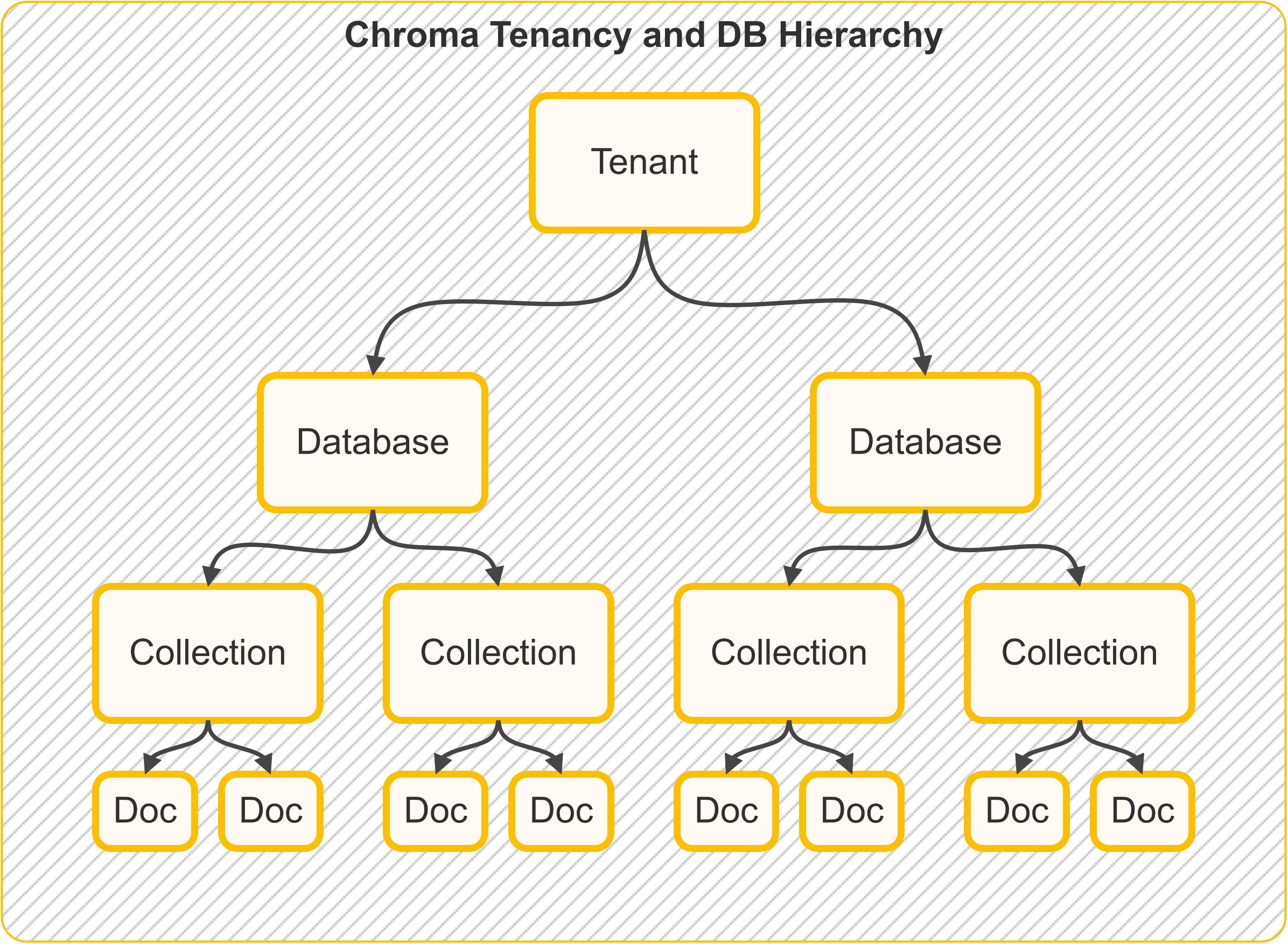
Quick mental model:
- Tenant = the top-level account or organization boundary
- Database = a project/app space inside that tenant
- Collection = a dataset (your searchable records) inside that database
Storage
In Chroma single-node, all data about tenancy, databases, collections and documents is stored in a single SQLite database.
Tenants
A tenant is the top-level container for data isolation. In practice, this is usually one team, company, or app owner.
Example: acme-inc as one tenant.
Databases
A database is a project space inside a tenant. One database can hold many collections.
Example: inside tenant acme-inc, you might have databases support-bot, website-search, and analytics-rag.
Collections
A collection is the dataset you query. It stores records (IDs, documents, metadata, embeddings) together.
Example: support_articles_v1.
Documents
Chunks of text
Documents in ChromaDB lingo are chunks of text that fit within the embedding model's context window. Unlike other frameworks that use the term "document" to mean a file, ChromaDB uses the term "document" to mean a chunk of text.
Documents are raw chunks of text that are associated with an embedding. Documents are stored in the database and can be queried.
Example document:
Metadata
Metadata is a dictionary of key-value pairs associated with an embedding.
Example metadata:
Metadata values can be:
- strings
- integers
- floats (
float32) - booleans
- arrays of strings, integers, floats, or booleans (
Chroma >= 1.5.0)
Array metadata constraints:
- all elements must be the same type
- empty arrays are not allowed
- nested arrays are not supported
No Built-In Metadata Contract Enforcement
Chroma validates metadata value types, but it does not enforce a per-collection metadata schema contract.
If you need required keys, enums, or numeric ranges, validate metadata in your app before add() / upsert().
See Metadata Schema Validation.
See Array Metadata for examples with $contains / $not_contains.
Runnable filter examples:
Embedding Function
An embedding function is the model/API that turns text into vectors.
You run it on:
- documents (when writing data)
- queries (when searching)
See Chroma's official embedding integrations.
Embeddings
An embedding is the numeric vector representation of text, typically a list of float32 values.
You can think of it as a machine-friendly fingerprint of meaning.
Distance Function
Distance functions define similarity between vectors:
- Cosine: common for semantic text similarity
- Euclidean (
l2): geometric distance - Inner Product (
ip): common in recommendation-like scenarios
In most query outputs, lower distance means closer match.
Search Concepts
Most search systems follow this flow: eligible pool -> ranked list -> optional fusion -> optional grouping -> returned page.
Use this running example:
- Query intent: "Find troubleshooting docs about SSO login failures."
- Constraints: only
status=publishedfromyear >= 2024. - Output goal: top 20 results (
title+score), without one product area dominating.
| Stage | What it decides | Chroma concept |
|---|---|---|
| 1. Candidate selection | Which records are allowed to compete | where, where_document |
| 2. Relevance ranking | Which eligible records appear first | Knn / ranking expressions |
| 3. Hybrid fusion (optional) | How multiple ranked lists are combined | Rrf |
| 4. Diversity / dedup (optional) | How many records to keep per bucket | GroupBy + MinK / MaxK |
| 5. Response shaping | How much and which fields to return | limit, pagination, select |
1) Filters decide eligibility (not relevance)
Filters answer: "Can this record be considered?"
wherefilters metadata (for examplestatus=published,year >= 2024).where_documentfilters document text content.- Filters remove non-matching records, but they do not define final ranking order.
2) Ranking decides order among eligible records
Ranking answers: "Among the records that passed filters, which are most relevant?"
Knncomputes similarity/distance ordering for eligible records.- In Search API scoring, lower scores represent better matches.
For the running example, ranking pushes SSO/login-related incidents closest to the top after the eligibility filters are applied.
3) RRF fuses multiple rankings when score scales differ
Hybrid fusion answers: "How do we merge strong semantic matches with strong keyword matches?"
Rrfcombines rankings by position, not raw score magnitude.- This is useful when dense and sparse ranking scores are on different scales.
In the running example, dense retrieval might catch "authentication outage", while sparse retrieval catches exact tokens like "SSO" and "SAML"; Rrf blends both lists.
4) Grouping/aggregation shapes the final mix
Grouping answers: "How do we avoid one category dominating the top results?"
GroupBypartitions ranked results by one or more keys.MinK/MaxKkeep top-k rows per group before flattening.
In the running example, grouping by product_area with k=2 can prevent ten near-duplicate auth incidents from crowding out other useful categories.
5) Response shaping controls what comes back
Response shaping answers: "How much should the API return, and which fields do you actually need?"
- Pagination controls page size and offset.
selectcontrols the returned payload.
This keeps responses smaller and focused for downstream UI or agent use.
Example: if search found 2,000 matches, you might return only the first 20 IDs, titles, and scores.
See:
- Filters for
where/where_documentsyntax and operators. - Advanced Search Semantics for execution-stage behavior and tradeoffs.
- Search API Overview for the full query model.
- Ranking and Scoring, Hybrid Search with RRF, and Group By & Aggregation for ranking primitives and grouping concepts.
- Examples & Patterns for concrete Search API implementations.
How Data Flows Through Chroma Cloud (Distributed Chroma)
The animated flows below model Chroma Cloud / distributed Chroma, where gateway, WAL, compaction, and query execution are separate services. In local or single-node deployments, the same logical stages still apply but are often co-located in one process.
What this means:
- On writes: Chroma saves changes durably first, then updates indexes in the background.
- On reads: Chroma combines indexed data and recent log data so results stay up to date.
Write Path (Add / Update / Upsert / Delete)
In distributed Chroma, writes are acknowledged after WAL durability. Compaction materializes new index versions in the background.
Query Path (Get / Query / Search)
In distributed Chroma, strongly consistent reads combine indexed state with recent WAL state.
The detailed query pipeline is described in Advanced Queries.
Implementation-level (code-backed) local-vs-distributed query diagrams are in the For Power Users section below.
For Power Users
This section is a code-oriented map of distributed Chroma, based on the Rust workspace (rust/) and the distributed architecture docs.
If you mostly care about product behavior, you can skip this section. This part is for readers who want to connect concepts to Rust implementation details.
Execution Paths (Code-Backed)
These diagrams are traced from the Rust frontend/segment/log implementation (rust/frontend, rust/segment, rust/log).
Tip: treat these as "what service does what" maps, not required reading for everyday app development.
Interactive Local Query Path (Single-Node SQLite + HNSW)
Click any stage to inspect what happens in the local executor path. First read triggers backfill/purge into local metadata + HNSW segments.
Selected stage
Validation + Segment Resolve
Service: FrontendServer + ServiceBasedFrontend
Request validation/auth happens in frontend, then collection + segment ids are resolved before plan execution.
Distributed Frontend Dispatch Path (Cloud)
In distributed mode, frontend routes Knn/Get/Search plans to query workers over gRPC. Worker-side execution uses distributed segment/index types (HnswDistributed or Spann with blockfile segments), not frontend-local SQLite + HNSW providers.
Code references for the two paths:
- Local segment types on collection create:
Executor::LocalcreatesHnswLocalPersisted+Sqlite - Local query execution:
LocalExecutorusesSqliteMetadataReader+LocalSegmentManager::get_hnsw_reader - Distributed query execution:
DistributedExecutordispatchesknn/get/searchvia gRPC query clients
Distributed Architecture (Main Services)
- Gateway / frontend API service:
rust/frontend(receives API calls and dispatches work) (server) - Query executor service:
rust/worker(runs query operators and orchestrators) (query entrypoint, query server) - Compaction service:
rust/worker(turns WAL/log history into read-optimized segment versions) (compaction orchestrator) - Write-ahead log:
rust/wal3(durable append-only change log) (design README) - Garbage collector service:
rust/garbage_collector(cleans old index/log artifacts safely) (orchestrator)
See also the official architecture doc: Distributed Chroma Architecture.
Main Primitives and Index Families
At the segment/type level (rust/types/src/segment.rs), distributed Chroma uses segment types such as:
BlockfileMetadata,BlockfileRecordHnswDistributedSpann,QuantizedSpannSqlite
In simple terms:
Blockfile*segments store compacted record/metadata data.HnswDistributed/Spann/QuantizedSpannare vector-search structures.Sqliteis still used for specific metadata/system concerns.
And at the index crate level (rust/index/src), major families include:
- Vector ANN:
hnsw,spann,quantized_spann - Full text:
fulltext - Metadata:
metadata - Sparse retrieval support:
sparse
SPANN in Distributed Chroma
Core implementation: rust/index/src/spann/types.rs.
Quick intuition: instead of searching one giant graph, SPANN first searches cluster centers, then looks inside the best matching posting lists.
Operationally, SPANN combines:
- a head/center ANN structure (HNSW over centers)
- posting lists keyed by center/head id (blockfile-backed)
- a versions map (
doc_offset_id -> version) to filter stale entries - a persisted
max_head_idfor deterministic head allocation across compactions
The write-side behavior includes:
- add/update/delete on posting lists and versions map
- splitting oversized posting lists into new heads
- reassigning points to nearby heads after split/merge operations
- optional garbage collection policies:
- posting-list random-sample cleanup
- HNSW full rebuild or delete-percentage-triggered rebuild
Blockfile Format and Update Model
Core implementation: rust/blockstore/src/arrow.
Quick intuition: blockfiles are immutable Arrow-backed data blocks with copy-on-write updates, so reads stay stable while writes build new versions.
Production blockfiles are Arrow-backed and use:
- immutable blocks for persisted data
- an in-memory sparse index mapping key ranges to block ids
- writer-side deltas for mutation batching (
set/delete) - copy-on-write for updates via
fork(...)
Update lifecycle:
- Writer mutates deltas and may split blocks when over target block size.
- Sparse index is updated to point at new block ids.
commit()converts deltas into immutable blocks and prepares a flusher.flush()persists blocks, then atomically persists root metadata/sparse index.
Relevant code:
Compaction and Registration
Compaction in distributed mode (rust/worker/src/execution/orchestration/compact.rs) follows an explicit staged flow:
- fetch and materialize logs
- apply to segment writers (record/metadata/vector)
- commit and flush segment artifacts
- register new segment metadata and offsets in sysdb/log metadata
This is the core bridge from WAL durability to read-optimized segment versions.
What this means: compaction is the "make recent writes fast to read" job.
Garbage Collection (Index Files + WAL)
Two GC tracks run in the Rust implementation:
- Segment/index artifact GC in
rust/garbage_collector: - construct collection version graph (including fork dependencies)
- compute versions to delete using cutoff + min-versions retention
- compute unreferenced files and clean up (dry-run / rename / delete)
- WAL GC in
wal3: - three-phase GC flow (compute garbage, manifest synchronization, delete)
- cursor-driven safety so required log ranges remain pinned
What this means: GC removes storage that is no longer needed, but only after safety checks confirm active readers won't break.
Relevant code: